| ID |
Date |
Author |
Status |
Type |
Category |
Important |
Subject |
Icon |
|
16
|
Wed Sep 16 12:22:18 2020 |
Entered by Hayg Guler from 134.158.195.145 on Wed Sep 16 12:17:51 2020 | Under Process | Info | Temperature |
|
Tests chiller canon, entered from 134.158.195.145 | |
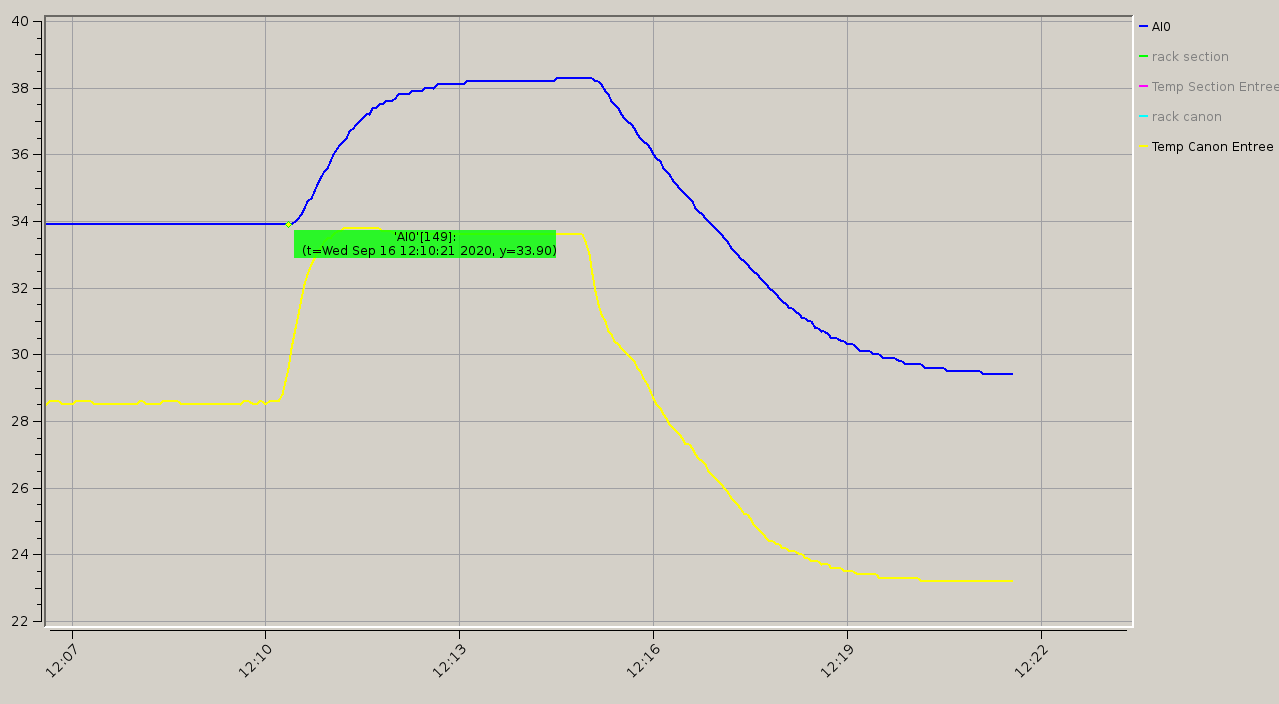
Tests avec nouvelle pt100 sur la structure du Canon
Consigne 30°C
Température entrée canon : 28.6 °C (pt100 sur l'eau)
Température sur la structure : 33.9°C
Il semblerait que l'écart de température est constant (environ 5°C)
|
| Attachment 1: Selection_011.png
|
 |
|
17
|
Thu Sep 17 17:15:24 2020 |
Entered by Hayg Guler from 134.158.195.145 on Thu Sep 17 17:02:47 2020 | Under Process | Info | Temperature |
|
Chiller Canon , entered from 134.158.195.145 | |
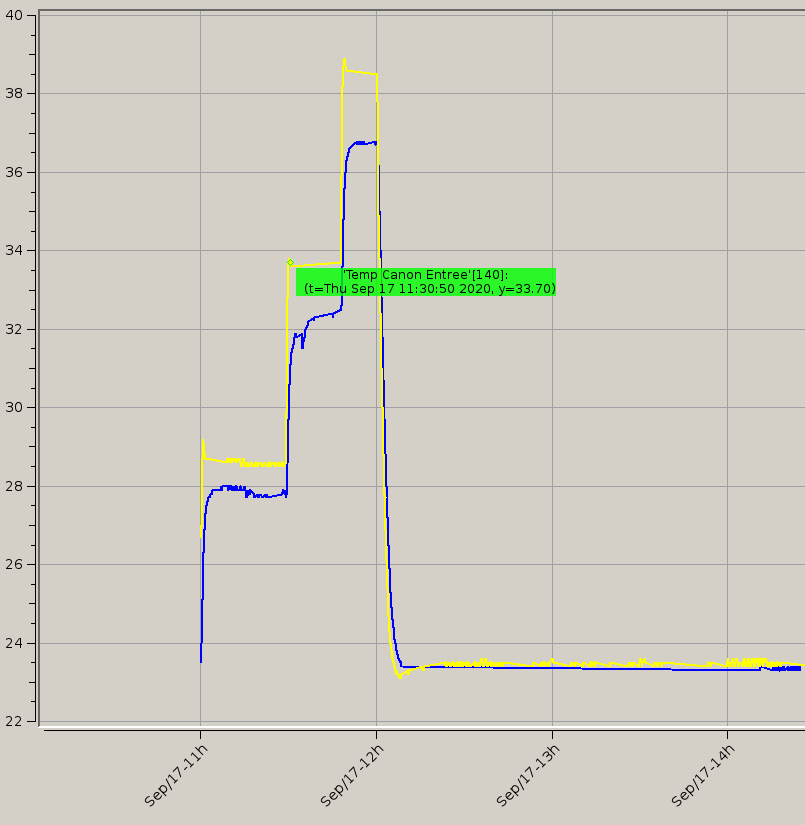
Tests de calibration pour les températures du Chiller canon
Problematique :
températude de consigne en V. Or la conversion dans le chiller pour avoir des °C n'est pas correcte vis à vis des mesures :
- PT100 au niveau de la clarinette (courbe jaune)
- PT100 sur la stucture du Canon (courbe bleue)
Nous refaisons la calibration, et les courbes de calibration (linéaire mais ne passant pas par zero) seront utilisés pour les consignes.
Temperatures_canon_vs_consigne
| Consigne (V) |
Temp (Corps canon) |
Temp (Eau, Clarinette) |
| 5 |
23.40 |
23.50 |
| 7 |
32.40 |
33.60 |
| 8 |
36.70 |
38.60 |
Consigne (V) = 4.3*Consigne(°C) +2.3 |
| Attachment 1: Selection_012.png
|
 |
|
18
|
Wed Jul 21 17:17:14 2021 |
Entered by Hayg Guler from 134.158.195.141 on Wed Jul 21 17:16:56 2021 | Not Fixed | Linac | RF D1 |
|
Probleme Redpitaya 2 et 4 | |
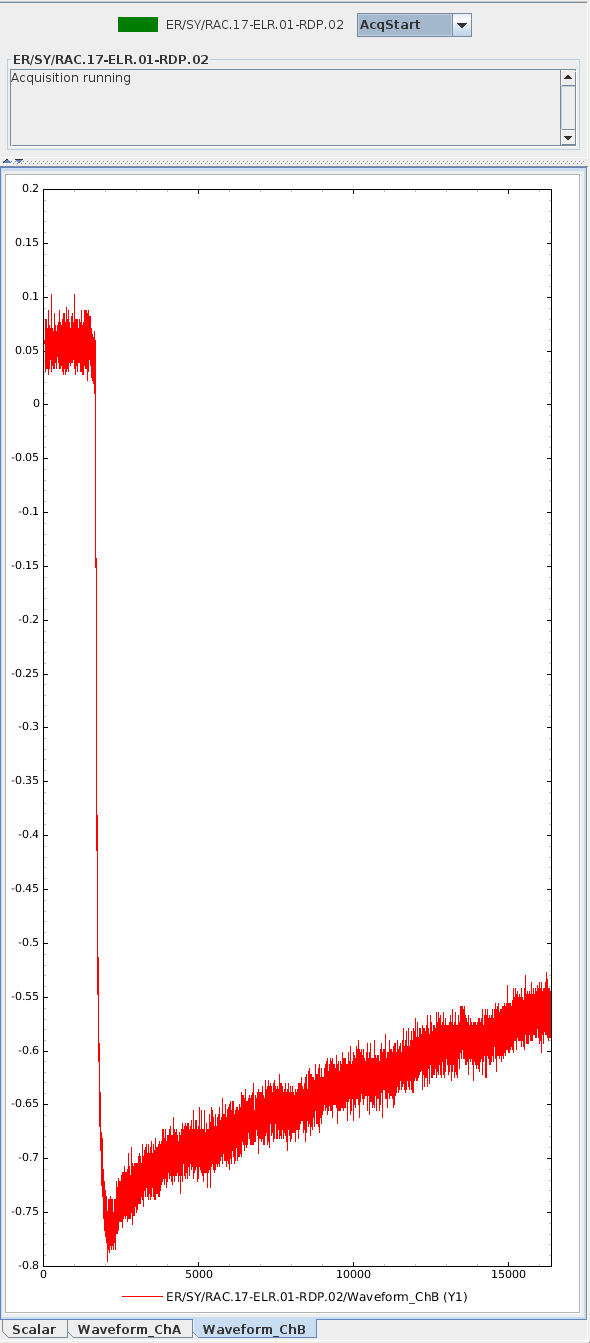
Soucis RPY 2 et 4
voies :
signal déformé, cf impression d'écran.
|
| Attachment 1: rpy2voie2Pb.png
|
 |
|
1
|
Thu Jun 6 10:58:43 2019 |
Miwiwi | | Question | Docs |
|
, entered from 134.158.195.143 | |
| coucou loulou |
| Attachment 1: index.jpeg
|
 |
|
2
|
Thu Jun 6 11:53:24 2019 |
nfalcoz | | Question | Docs |
|
, entered from 134.158.195.143 | |
| Coucou Test |
| Attachment 1: index.jpeg
|
 |
|
3
|
Thu Jun 6 11:54:08 2019 |
nfalcoz | | Question | Docs |
|
, entered from 134.158.195.143 | |
| Coucou Test |
| Attachment 1: index.jpeg
|
 |
|
4
|
Thu Jun 6 12:00:33 2019 |
nfalcoz | | Question | Docs |
|
, entered from 134.158.195.143 | |
| Coucou Test2 |
| Attachment 1: index.jpeg
|
 |
|
Draft
|
Tue Jun 11 12:25:21 2019 |
Entered by Falcoz Nicolas from 134.158.195.143 on Tue Jun 11 11:55:34 2019 | | | |
|
| |
|
|
6
|
Wed Jun 12 11:04:46 2019 |
nfalcoz | | Info | Docs |
|
, entered from 134.158.195.143 | |
| Essai 1 sans piece jointe |
| Attachment 1: index.jpeg
|
 |
|
7
|
Wed Jun 12 11:09:26 2019 |
nfalcoz | | Problem | Sondes Etuve |
|
, entered from 134.158.195.143 | |
| Essai 2 sans pièe jointe |
|
8
|
Wed Jun 12 11:24:05 2019 |
nfalcoz | | Problem | Sondes Etuve |
|
, entered from 134.158.195.143 | |
| /self.saisieTexte.toPlainText() |
|
9
|
Wed Jun 12 11:45:26 2019 |
nfalcoz | | Urgent | Temperature |
|
, entered from 134.158.195.143 | |
| Essai 3 sans pièce jointe (-_/!?éèêü) |
|
10
|
Wed Jun 12 14:15:20 2019 |
Entered by Falcoz Nicolas from 134.158.195.143 on Wed Jun 12 14:15:07 2019 | | Problem | Etuves |
|
Test accent éè | |
Test accent éè |
|
11
|
Wed Jun 12 14:23:38 2019 |
nfalcoz | | Problem | Temperature |
|
, entered from 134.158.195.143 | |
| éééééèèè |
|
12
|
Fri Jun 14 13:55:33 2019 |
nfalcoz | | Fix | Sondes Etuve |
|
, entered from 134.158.195.143 | |
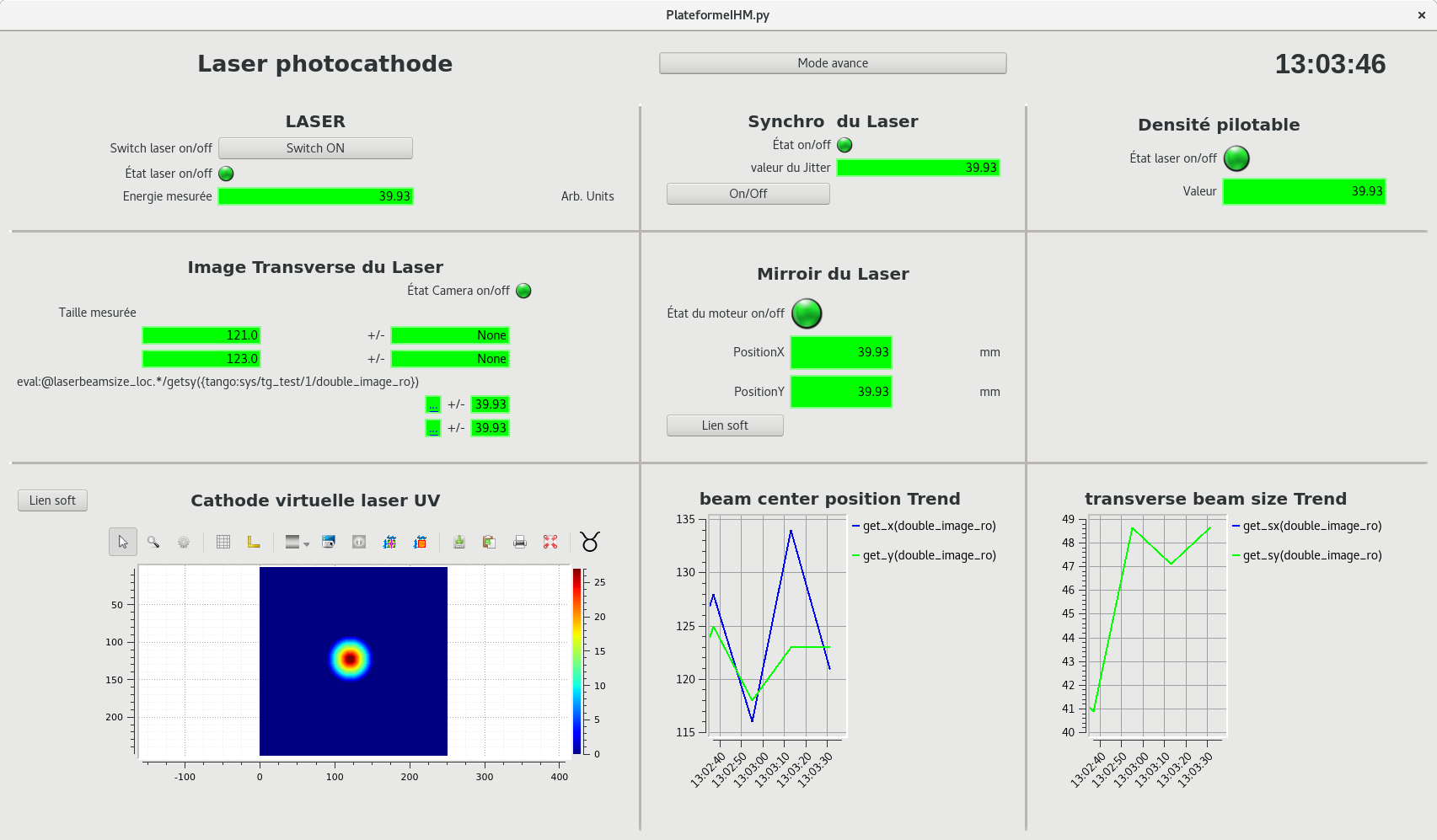
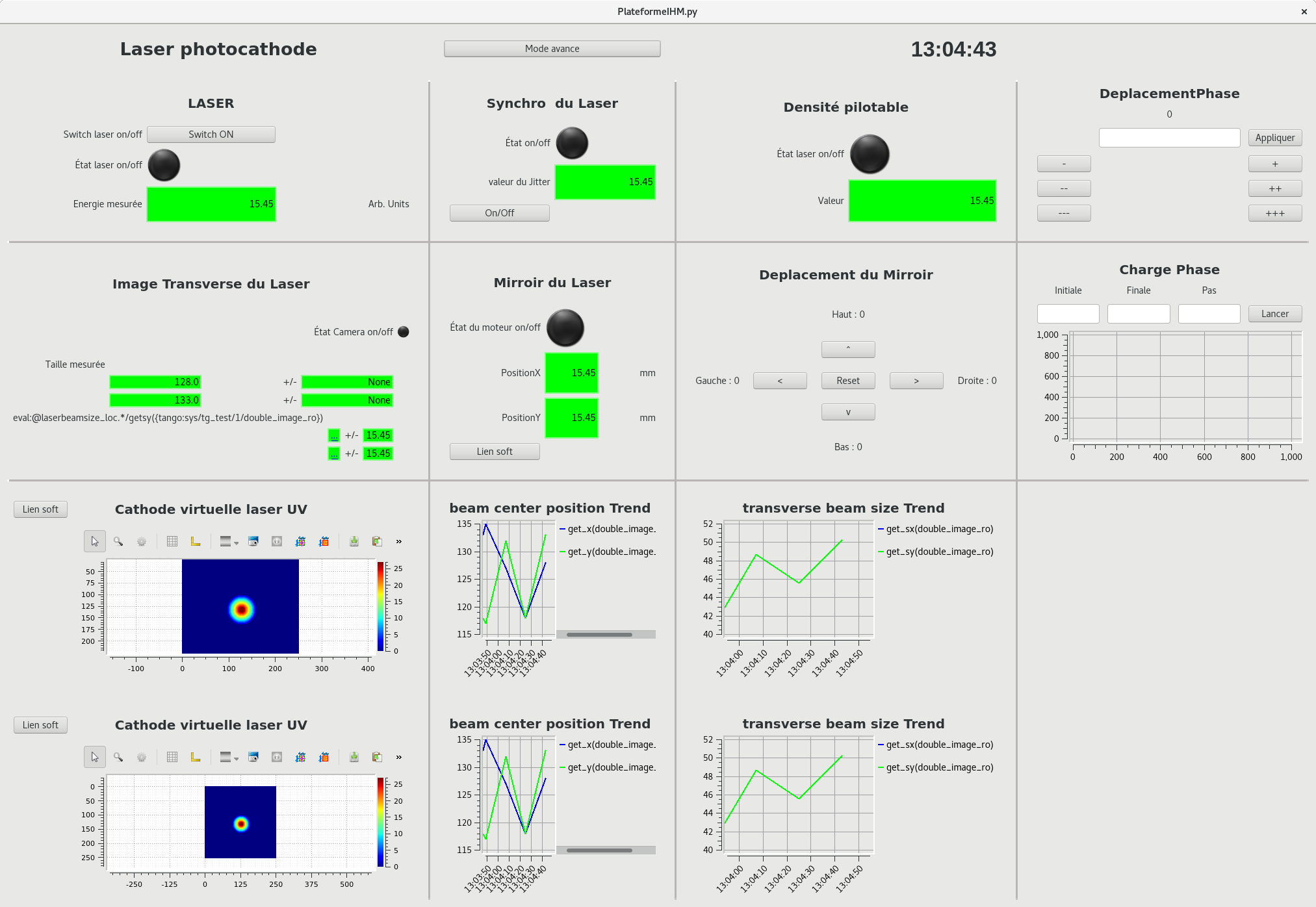
| Test 3 screens |
| Attachment 1: screen.png
|
 |
| Attachment 2: Laser.png
|
 |
| Attachment 3: LaserAvance.png
|
 |
|
13
|
Thu Jun 27 14:26:55 2019 |
nfalcoz | | Fix | Klystron |
|
, entered from 134.158.195.143 | |
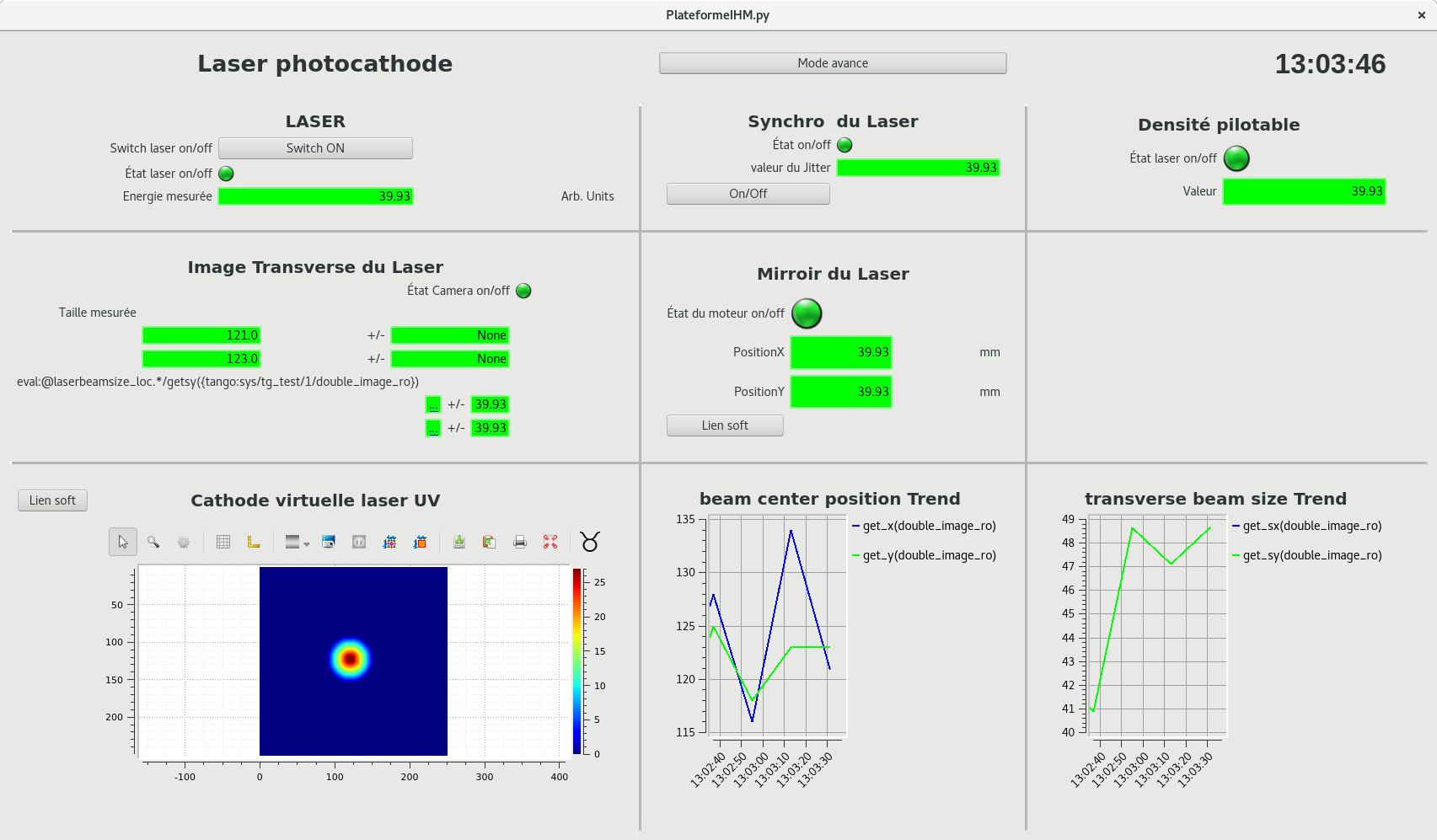
| Test IHMLogBook |
| Attachment 1: screen.png
|
 |
| Attachment 2: Laser.png
|
 |
|
14
|
Thu Jul 11 11:14:46 2019 |
nfalcoz | | Other | Docs |
|
, entered from 134.158.195.143 | |
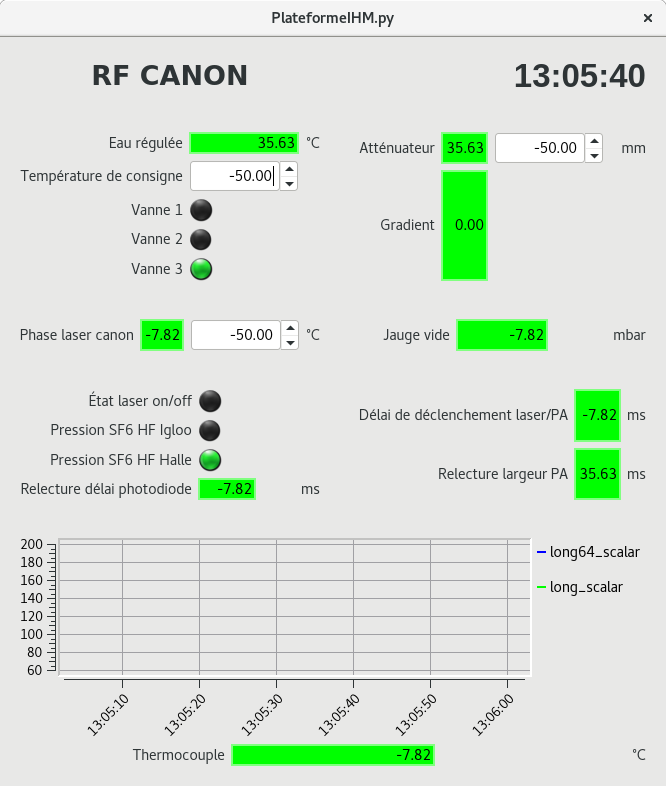
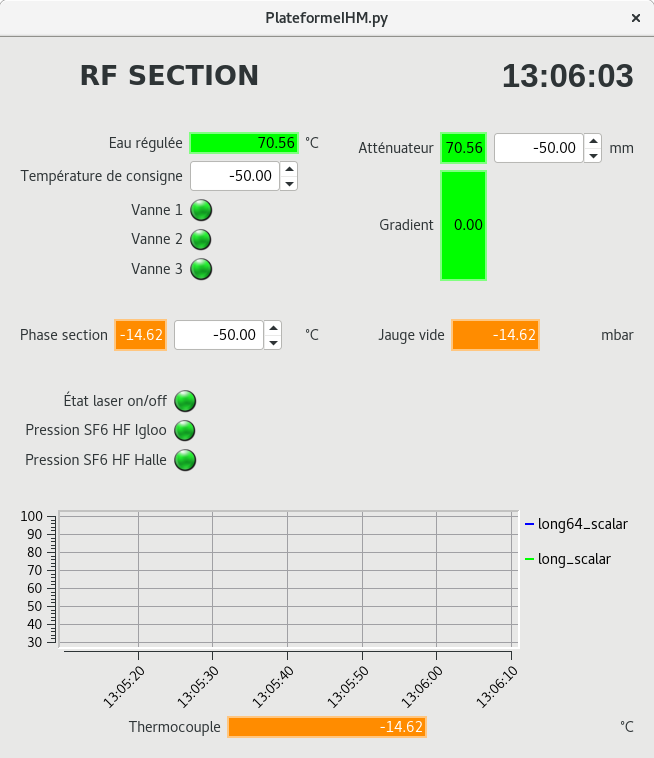
| Test |
| Attachment 1: screenshot.py
|
#!/usr/bin/env python
# Python screenshot tool (fullscreen/area selection)
# Tested on:
# Lubuntu 13.04 x86_64
# Gentoo 4.1.7-hardened-r1 x86_64

import sys
from PyQt4 import QtCore, QtGui
from commands import getoutput
from StringIO import StringIO
from Xlib import X, display, Xutil


# Documentation for python-xlib here:
# http://python-xlib.sourceforge.net/doc/html/index.html

class XSelect:
    def __init__(self, display):
        # X display
        self.d = display

        # Screen
        self.screen = self.d.screen()

        # Draw on the root window (desktop surface)
        self.window = self.screen.root

        # If only I could get this working...
        #cursor = xobject.cursor.Cursor(self.d, Xcursorfont.crosshair)
        #cursor = self.d.create_resource_object('cursor', Xcursorfont.X_cursor)
        cursor = X.NONE

        self.window.grab_pointer(1, X.PointerMotionMask|X.ButtonReleaseMask|X.ButtonPressMask,
                X.GrabModeAsync, X.GrabModeAsync, X.NONE, cursor, X.CurrentTime)

        self.window.grab_keyboard(1, X.GrabModeAsync, X.GrabModeAsync, X.CurrentTime)

        colormap = self.screen.default_colormap
        color = colormap.alloc_color(0, 0, 0)
        # Xor it because we'll draw with X.GXxor function
        xor_color = color.pixel ^ 0xffffff

        self.gc = self.window.create_gc(
            line_width = 1,
            line_style = X.LineSolid,
            fill_style = X.FillOpaqueStippled,
            fill_rule  = X.WindingRule,
            cap_style  = X.CapButt,
            join_style = X.JoinMiter,
            foreground = xor_color,
            background = self.screen.black_pixel,
            function = X.GXxor,
            graphics_exposures = False,
            subwindow_mode = X.IncludeInferiors,
        )

        done    = False
        started = False
        start   = dict(x=0, y=0)
        end     = dict(x=0, y=0)
        last    = None
        drawlimit = 10
        i = 0

        while done == False:
            e = self.d.next_event()

            # Window has been destroyed, quit
            if e.type == X.DestroyNotify:
                sys.exit(0)

            # Mouse button press
            elif e.type == X.ButtonPress:
                # Left mouse button?
                if e.detail == 1:
                    start = dict(x=e.root_x, y=e.root_y)
                    started = True

                # Right mouse button?
                elif e.detail == 3:
                    sys.exit(0)

            # Mouse button release
            elif e.type == X.ButtonRelease:
                end = dict(x=e.root_x, y=e.root_y)
                if last:
                    self.draw_rectangle(start, last)
                done = True
                pass

            # Mouse movement
            elif e.type == X.MotionNotify and started:
                i = i + 1
                if i % drawlimit != 0:
                    continue

                if last:
                    self.draw_rectangle(start, last)
                    last = None

                last = dict(x=e.root_x, y=e.root_y)
                self.draw_rectangle(start, last)
                pass

            # Keyboard key
            elif e.type == X.KeyPress:
                sys.exit(0)

        self.d.flush()

        coords = self.get_coords(start, end)
        if coords['width'] <= 1 or coords['height'] <= 1:
            sys.exit(0)
        else:
            print "%d %d %d %d" % (coords['start']['x'], coords['start']['y'], coords['width'], coords['height'])

    def get_coords(self, start, end):
        safe_start = dict(x=0, y=0)
        safe_end   = dict(x=0, y=0)

        if start['x'] > end['x']:
            safe_start['x'] = end['x']
            safe_end['x']   = start['x']
        else:
            safe_start['x'] = start['x']
            safe_end['x']   = end['x']

        if start['y'] > end['y']:
            safe_start['y'] = end['y']
            safe_end['y']   = start['y']
        else:
            safe_start['y'] = start['y']
            safe_end['y']   = end['y']

        return {
            'start': {
                'x': safe_start['x'],
                'y': safe_start['y'],
            },
            'end': {
                'x': safe_end['x'],
                'y': safe_end['y'],
            },
            'width' : safe_end['x'] - safe_start['x'],
            'height': safe_end['y'] - safe_start['y'],
        }

    def draw_rectangle(self, start, end):
        coords = self.get_coords(start, end)
        self.window.rectangle(self.gc,
            coords['start']['x'],
            coords['start']['y'],
            coords['end']['x'] - coords['start']['x'],
            coords['end']['y'] - coords['start']['y']
        )


class Screenshot(QtGui.QWidget):
    def __init__(self):
        super(Screenshot, self).__init__()

        self.screenshotLabel = QtGui.QLabel()
        self.screenshotLabel.setSizePolicy(QtGui.QSizePolicy.Expanding,
                QtGui.QSizePolicy.Expanding)
        self.screenshotLabel.setAlignment(QtCore.Qt.AlignCenter)
        self.screenshotLabel.setMinimumSize(240, 160)

        self.createOptionsGroupBox()
        self.createButtonsLayout()

        mainLayout = QtGui.QVBoxLayout()
        mainLayout.addWidget(self.screenshotLabel)
        mainLayout.addWidget(self.optionsGroupBox)
        mainLayout.addLayout(self.buttonsLayout)
        self.setLayout(mainLayout)

        self.area = None
        self.shootScreen()
        self.delaySpinBox.setValue(1)

        self.setWindowTitle("Screenshot")
        self.resize(300, 200)

    def resizeEvent(self, event):
        scaledSize = self.originalPixmap.size()
        scaledSize.scale(self.screenshotLabel.size(), QtCore.Qt.KeepAspectRatio)
        if not self.screenshotLabel.pixmap() or scaledSize != self.screenshotLabel.pixmap().size():
            self.updateScreenshotLabel()

    def selectArea(self):
        self.hide()

        #print sys.argv[0]
        resArea = getoutput('python ./screenshot.py -A') #TODO horrible 1/2 !
        if resArea and resArea != '0 0 0 0':
            print resArea.split()
            self.area = xo, yo, x, y = resArea.split()
            self.areaLabel.setText("Area: x%s y%s to x%s y%s" % (xo, yo, x, y))
            self.shootScreen()
            # print 'OK', self.area #DEBUG
        elif self.area is not None:
            self.area = None
            self.areaLabel.setText("Area: fullscreen")
            self.shootScreen()

        self.show()

    def newScreenshot(self):
        if self.hideThisWindowCheckBox.isChecked():
            self.hide()
        self.newScreenshotButton.setDisabled(True)

        QtCore.QTimer.singleShot(self.delaySpinBox.value() * 1000, self.shootScreen)

    def saveScreenshot(self):
        format = 'png'
        initialPath = QtCore.QDir.currentPath() + "/untitled." + format

        fileName = QtGui.QFileDialog.getSaveFileName(self, "Save As",
                initialPath,
                "%s Files (*.%s);;All Files (*)" % (format.upper(), format))
        if fileName:
            self.originalPixmap.save(fileName, format)

    def shootScreen(self):
        if self.delaySpinBox.value() != 0:
            QtGui.qApp.beep()

        # Garbage collect any existing image first.
        self.originalPixmap = None
        self.originalPixmap = QtGui.QPixmap.grabWindow(QtGui.QApplication.desktop().winId())
        if self.area is not None:
            qi = self.originalPixmap.toImage()
            size = qi.size()
            qi = qi.copy(int(self.area[0]), int(self.area[1]), int(self.area[2]), int(self.area[3]))
            self.originalPixmap = None
            self.originalPixmap = QtGui.QPixmap.fromImage(qi)

        self.updateScreenshotLabel()

        self.newScreenshotButton.setDisabled(False)
        if self.hideThisWindowCheckBox.isChecked():
            self.show()

    def updateCheckBox(self):
        if self.delaySpinBox.value() == 0:
            self.hideThisWindowCheckBox.setDisabled(True)
        else:
            self.hideThisWindowCheckBox.setDisabled(False)

    def createOptionsGroupBox(self):
        self.optionsGroupBox = QtGui.QGroupBox("Options")

        self.delaySpinBox = QtGui.QSpinBox()
        self.delaySpinBox.setSuffix(" s")
        self.delaySpinBox.setMaximum(60)
        self.delaySpinBox.valueChanged.connect(self.updateCheckBox)

        self.delaySpinBoxLabel = QtGui.QLabel("Screenshot Delay:")

        self.hideThisWindowCheckBox = QtGui.QCheckBox("Hide This Window")
        self.hideThisWindowCheckBox.setChecked(True)

        self.areaLabel = QtGui.QLabel("Area: fullscreen")

        optionsGroupBoxLayout = QtGui.QGridLayout()
        optionsGroupBoxLayout.addWidget(self.delaySpinBoxLabel, 0, 0)
        optionsGroupBoxLayout.addWidget(self.delaySpinBox, 0, 1)
        optionsGroupBoxLayout.addWidget(self.hideThisWindowCheckBox, 1, 0)
        optionsGroupBoxLayout.addWidget(self.areaLabel, 1, 1)
        self.optionsGroupBox.setLayout(optionsGroupBoxLayout)

    def createButtonsLayout(self):
        self.selectAreaButton = self.createButton("Select Area",
                self.selectArea)

        self.newScreenshotButton = self.createButton("New Screenshot",
                self.newScreenshot)

        self.saveScreenshotButton = self.createButton("Save Screenshot",
                self.saveScreenshot)

        self.quitScreenshotButton = self.createButton("Quit", self.close)

        self.buttonsLayout = QtGui.QHBoxLayout()
        self.buttonsLayout.addStretch()
        self.buttonsLayout.addWidget(self.selectAreaButton)
        self.buttonsLayout.addWidget(self.newScreenshotButton)
        self.buttonsLayout.addWidget(self.saveScreenshotButton)
        self.buttonsLayout.addWidget(self.quitScreenshotButton)

    def createButton(self, text, member):
        button = QtGui.QPushButton(text)
        button.clicked.connect(member)
        return button

    def updateScreenshotLabel(self):
        self.screenshotLabel.setPixmap(self.originalPixmap.scaled(
                self.screenshotLabel.size(), QtCore.Qt.KeepAspectRatio,
                QtCore.Qt.SmoothTransformation))
... 19 more lines ...
|
| Attachment 2: RFCanon.png
|
 |
| Attachment 3: RFSection.png
|
 |
|
15
|
Mon Jul 22 14:45:32 2019 |
Entered by Kevin Dupraz from 193.55.29.169 on Mon Jul 22 14:45:10 2019 | Fixed | Info | Infra |
|
Mot de passe Cameras Surveillance | |
Les caméras sont des HIKVISION :
HIKVISION DS-2DE4A404IW-DE(2.8-12MM)
Caméra IP HIKVISION PTZ 4MP + IR 50m
- CMOS à balayage progressif 1 / 1.9 "
- Résolution jusqu'à 2560 × 1440
- Ultra-faible lumière:
- Couleur: 0.002 Lux @ (F1.6, AGC ON)
N / B: 0.0002 Lux @ (F1.6, AGC ON)
0 Lux avec IR
- Zoom optique 4 ×, zoom numérique 16 ×
- Désembuage numérique, EIS, 3D DNR, BLC, HLC, WDR, exposition régionale, focus régional
- Jusqu'à 50 m de distance IR
- 12 VDC & PoE + (802.3at, classe 4)
- Prise en charge de la compression vidéo H.265 + / H.265
Le mot de passe pour accerde à l'interface de configuration des caméras de surveillance est :
user: admin
pass: Th0mx_CAM
user: SDC
pass: thomx_123
elles sont sous l'adresse IP: 192.168.1.10 à 192.168.1.15
docs IP keyboard C400-I:
https: //youtu.be/mdsnin-pcSg
The C400 keyboard works well with Hikvision PTZs. For other brand PTZs, it requires call special function preset to set up and call patrol and pattern. If there is any question with installation, please send detailed problems to lefteksupport@163.com
|
| Attachment 1: C400-I_User_Manual.pdf
|
| Attachment 2: UD14905B_Baseline_User-Manual-of-Network-Speed-Dome_V5.6.12_20190802.pdf
|
|
19
|
Tue Oct 12 12:07:22 2021 |
Entered by Viktor Soskov from 134.158.195.153 on Tue Oct 12 12:06:17 2021 | Fixed | Info | Linac | Laser |
|
Attenuator_11_10_201 | |
mesures faites avec 180 uJ et Iris entièrement ouverte. Puissance mesurée au niveau du shutter (après atténuateur) |
| Attachment 1: Attenuator_11_10_21.pdf
|
|
Draft
|
Tue Oct 26 18:31:38 2021 |
Entered by Viktor Soskov from 134.158.195.153 on Tue Oct 26 18:30:49 2021 | Fixed | Linac | |
|
Laser_Cathode_PulseWidth_Compressor | |
|
| Attachment 1: SR_20200824_1-9460.pdf
|
|
Draft
|
Wed Oct 27 09:41:39 2021 |
Entered by Viktor Soskov from 134.158.195.153 on Wed Oct 27 09:41:22 2021 | Fixed | Linac | |
|
UV Energy_PD vs Atten | |
|
| Attachment 1: UVenergy_PG_Atten1.pdf
|
|
22
|
Tue Nov 16 10:00:54 2021 |
Entered by Kevin Dupraz from 134.158.89.107 on Tue Nov 16 10:00:37 2021 | New Solution | Info | Linac | Aimants | Electronique |
|
Paramètrage Solénoïdes | |
mise à jours 20/01/2022 : conversion des mouvement moteur en mouvement réel, en fonction du fichier des paramètres constructeur à verifier en réelle pour la conversion pas moteur / angle
Les moteurs des solénoïdes du canon ont été réglés hier (15/11/2021) dans l'IcePAP baie17:
- board11: LI/AE/COL.01-MOT.01, axe X bobine focalisation 1/4 + codeur (translation X)
* AXMO/Nanotec ST5909L2008-B câblage parallèle (enc: WEDL5541-A06)
* 2000 coups encodeur par tour, 1mm/tour
* 100 poles pairs, 2.4 Ohm, (6V), 2A, (microstep : 2000 pas/tour)
* encodeur : QUAD, 2000 pas/tour
* conversion : 0.5 um/pas
- board12: LI/AE/COL.01-MOT.02, axe Z bobine focalisation 2/4 + codeur (translation Z)
* AXMO/Nanotec ST6018D4508-B câblage parallèle (enc: WEDL5541-A06)
* 2000 coups encodeur par tour, 250um/tour
* 50 poles pairs, 0.75 Ohm, (4V), 4.5A, (microstep : 2000 pas/tour)
* encodeur : QUAD, 2000 pas/tour
* conversion : 0.125 um/pas
- board13: LI/AE/COL.02-MOT.01, bobine focalisation 3/4 + codeur (rotation X, rayon de 276mm)
* Ametek/Haydon E35H4N-05-A31 (enc: US Digital E5-200-315-IE-D-D-D-B)
* 800 coups encodeur par tour, 600um/tour
* 50 poles pairs, 8.8 Ohm, (6.27V), 0.57A, (microstep : 800 pas/tour)
* encodeur : QUAD, 800 pas/tour
* conversion : 2.72 urad/pas (368 pas/mrad)
- board14: LI/AE/COL.02-MOT.02, bobine focalisation 4/4 + codeur (rotation Z, rayon de 336mm)
* Ametek/Haydon E35H4N-05-A31 (enc: US Digital E5-200-315-IE-D-D-D-B)
* 800 coups encodeur par tour, 600um/tour
* 50 poles pairs, 8.8 Ohm, (6.27V), 0.57A, (microstep : 800 pas/tour)
* encodeur : QUAD, 800 pas/tour
* conversion : 2.23 urad/pas (448 pas/mrad)
le fichier de répartition des icePAP sous atrium a été mis à jour en conséquence. Il faut mettre les fichiers constructeur dans l'espace atrium créé.
ci joint le plan avec les distance permettant de remonter à la relation angle(mrad) et distance parcourue par le moteur.
selon X : rayon de 276mm, soit 1 degré correspond à 4.81mm, ou 1mrad correspond à 0.276 mm
selon Z : rayon de 336mm, soit 1degré correspond à 5.86 mm, ou 1mrad correspond à 0.336 mm
TODO : les directions des moteurs selon leur signe
Bonne journée, |
| Attachment 1: Axmo_solenoide_translations.pdf
|
| Attachment 2: Conversion_mm_avec_angle_de_rotation_solenoide.pdf
|
|
23
|
Tue Nov 16 14:39:32 2021 |
Entered by Hayg Guler from 134.158.195.141 on Tue Nov 16 14:39:17 2021 | | Linac | RF D1 |
|
Calibrations et réglages Canon (Pierre, Nourredine) | |
| klystron à 1090 |
|
|
|
|
| att (dB) |
Pic (MW) au wattmètre |
Pic cristal (MW) |
% erreur |
Gradient (MV/m) |
| 2 |
3.9 |
4.12 |
6 |
69 |
| 1.75 |
4.1 |
4.39 |
7 |
71 |
| 1.5 |
4.35 |
4.66 |
7 |
73 |
| 1.25 |
4.6 |
4.92 |
7 |
75 |
| 1 |
5 |
5.2 |
4 |
79 |
| 0.75 |
5.3 |
5.58 |
5 |
81 |
| 0.5 |
5.6 |
5.92 |
6 |
83 |
| 0.25 |
6.1 |
6.27 |
3 |
87 |
| 0 |
6.6 |
6.64 |
1 |
91 |
|
|
24
|
Mon Jan 10 16:43:42 2022 |
Entered by Viktor Soskov from 134.158.195.153 on Mon Jan 10 16:43:10 2022 | | Info | Laser |
|
Cours d'eau sur le laser -cathode | |
Cours d'eau a passé à travers du gril de la climatisation (en toit de la salle laser ) et tombé sur le laser et la table optique!!!! |
|
25
|
Mon Feb 7 15:45:51 2022 |
Entered by Philippe G. (CC) from 78.203.22.151 on Sat Feb 5 18:56:52 2022 | Reference Solution | Info | CC |
|
ordi portable sous windows, entered from 134.158.196.106 | |
| Lors de la réunion vendredi, il a été demandé quels étaient les ordinateurs portables sous windows pour utilisation par le DG/SY.
Pour rappel, la liste des matériels déclarés sur le réseau informatique ThomX figure ici : https://atrium.in2p3.fr/c8fc130b-c7e5-4200-ba00-95e5f6921828
Marie et Christelle ont demandé vendredi à avoir la liste des ordi portables déclarés sur le réseau ThomX sous windows.
- portable-rf (RI-C2/RF/PC.01), sous Windows, sous la responsabilité du groupe RF
- op1 (CR/OP/PC.01), sous GNU/Linux
- thomx-dg1 (pas de code nomenclature), sous GNU/Linux, la responsabilité du groupe DG
- test-cc (pas de code nomenclature), sous GNU/Linux, sous la responsabilité du groupe CC |
|
26
|
Mon Mar 28 15:51:33 2022 |
Entered by Kevin Dupraz from 134.158.195.144 on Mon Mar 28 15:51:15 2022 | Reference Solution | Info | note | Linac | CC | Opt | Electronique |
|
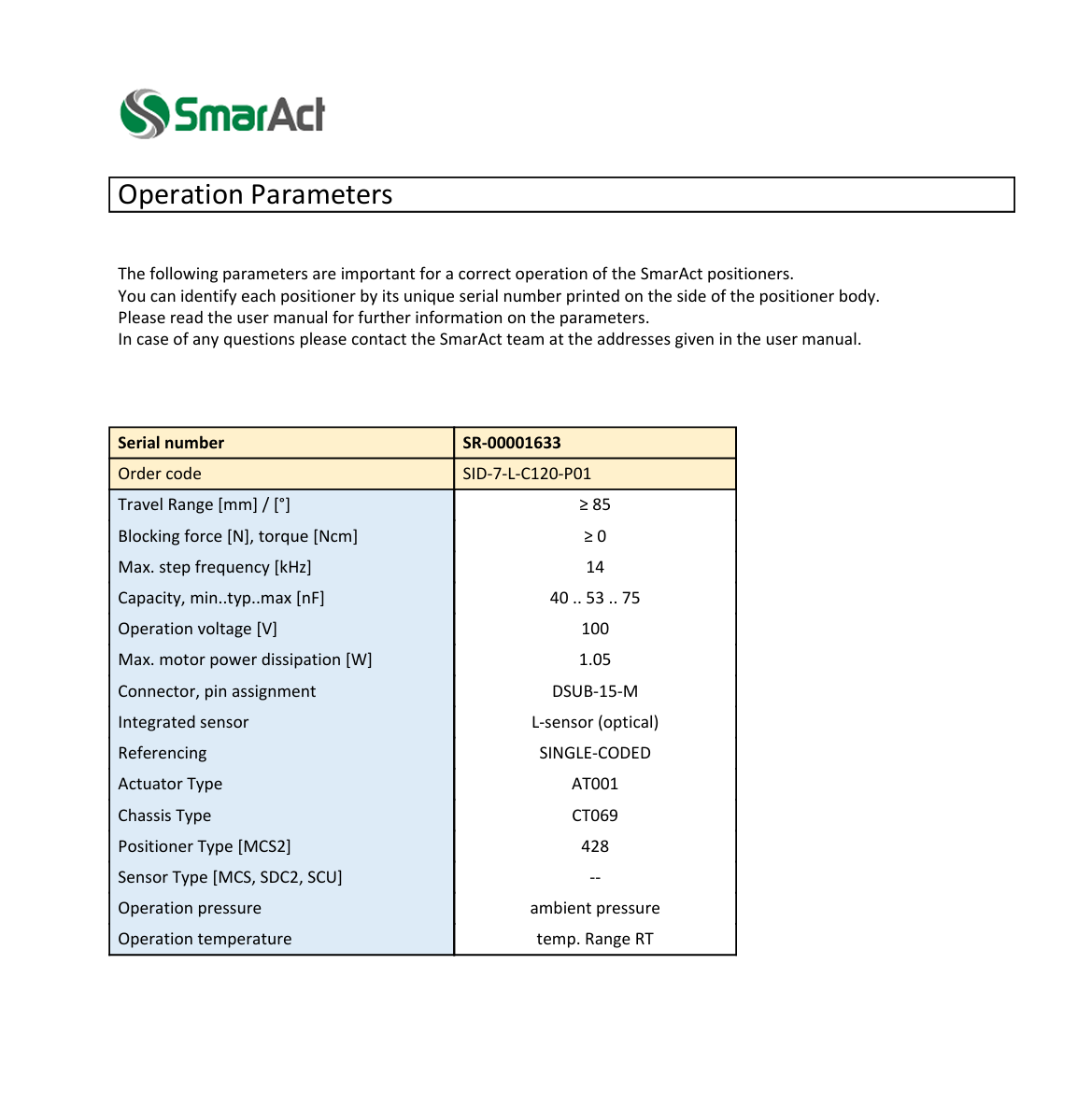
Configuration Iris motorisé Laser PhotoCathode | |
Les paramètres de l'iris sont les suivants :
Données d'entrée :
* Iris fermée à 0.5mm de diamètre
* Iris entièrement ouverte à 7mm de diamètre
Données contrôleur (sensor type 428) :
* max (7mm) = -85360 (-32145 m°)
* min (0.5mm) = 120 (33342 m°)
===> Donc l'échelle est inversée et la conversion (en natif l'unité est le n°) est : n°/mm (ouverture) : (120+85360)*1E6 / 6.5 = 13 150 769 231
et le décalage (offset) est de : -85360*1E6 - 0.5* 13 150 769 231 = -91 935 384 615
Paramètres Contrôleur MCS2 :
* logical scale offset : -91 935 384 615
* logical scale inversion : inverted
Propriétés DS moteur :
* AxisNumber : 0
* SensorType : 428
Attributs DS moteur :
* MoveMode : 0
* StepAmplitude : 65535
* StepFrequency : 1000
* Conversion : 13 150 769 231 pas/mm
* UnitLimit (Min et Max) : 0
* SensorMode : 1
Dans le DS contrôleur :
* ConnectType: net
|
| Attachment 1: Capture_d’écran_2026-02-05_110042.png
|
 |
|
27
|
Thu Mar 31 16:26:06 2022 |
Hayg | Reference Solution | Info | CC | Electronique |
|
Redpitaya --> signal sur page web | |
Pour afficher le signal de la redpitaya sur le web :
1/ on arrête le Ds
2/ mettre l'adresse ip sur le navigater
redpitaya.thomx.fr has address 192.168.209.91
redpitaya1-b13.thomx.fr has address 192.168.229.148
redpitaya1-b14.thomx.fr has address 192.168.229.123
redpitaya1-b17.thomx.fr has address 192.168.229.68
redpitaya1-b5.thomx.fr has address 192.168.229.10
redpitaya2-b13.thomx.fr has address 192.168.229.136
redpitaya2-b14.thomx.fr has address 192.168.229.135
redpitaya2-b17.thomx.fr has address 192.168.229.69
redpitaya2-b5.thomx.fr has address 192.168.229.11
redpitaya3-b17.thomx.fr has address 192.168.229.70
redpitaya3-b5.thomx.fr has address 192.168.229.12
redpitaya4-b17.thomx.fr has address 192.168.229.71
redpitaya4-b5.thomx.fr has address 192.168.229.13
redpitaya5-b5.thomx.fr has address 192.168.229.14
3/ redémarrer le Ds via Astor
Autrement, même en jouant sur les paramètres du signal sur l'interface, le signal n'apparait pas.
|
|
28
|
Fri Jun 17 10:53:58 2022 |
Entered by Super Team from 134.158.195.141 on Fri Jun 17 10:53:43 2022 | | Info | Linac | RF D1 |
|
Moteurs Atténuateur déphaseurs -> Vélocité | |
Vélocité modifiée au niveau des Ds :
li/hfi/dep.01-mot.01 : 25 step/s --> 80
li/hfi/att.01-mot.01 : 5 step/s --> 50
li/hfi/att.01-mot.02 : 5 step/s --> 50
|
|
29
|
Fri Dec 9 10:21:35 2022 |
Entered by Viktor Soskov from 134.158.195.153 on Fri Dec 9 10:21:17 2022 | Fixed | Info | Laser |
|
Laser status | |
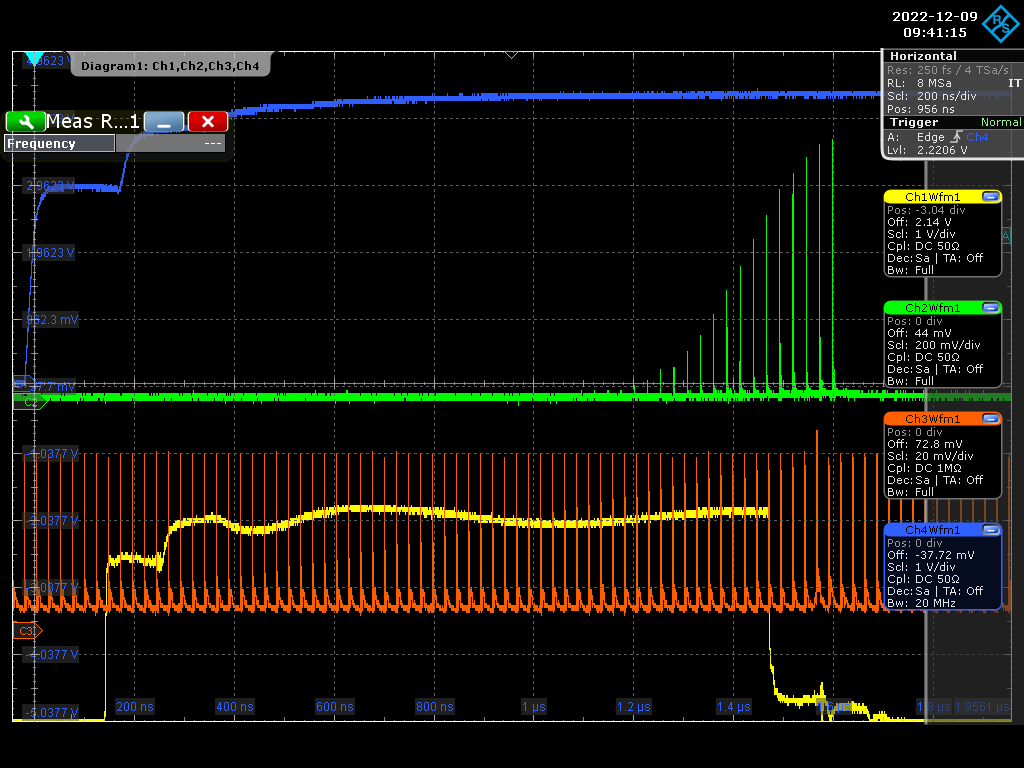
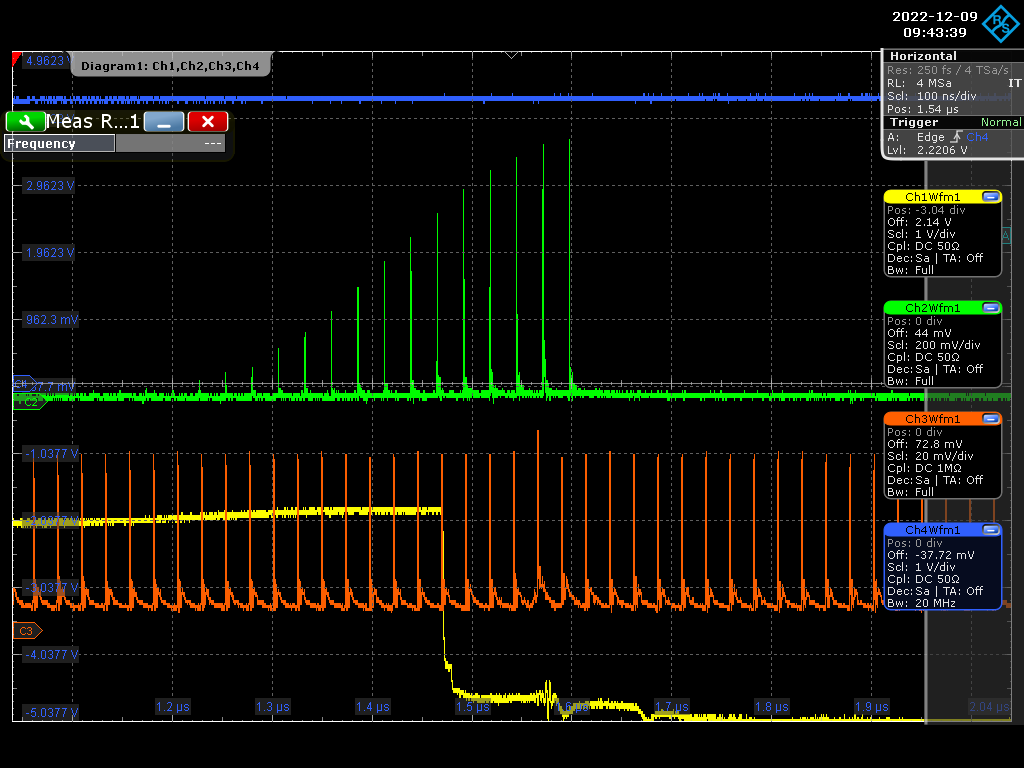
Bonjour, voici les signaux à contrôler pour tester le fonctionnement du laser (l"état correct).
1. en bleu - "timing" 1-50Hz
2. en vert - signal "Amplificateur"
3. en rouge - signal "Oscillateur"
4. en jaune - signal " Pockels"
L"oscillateur est synchronisé sur l'horloge (master).
|
| Attachment 1: Laser_Output_2022-12-09_094114.png
|
 |
| Attachment 2: Laser_Output_2022-12-09_094339.png
|
 |
|
30
|
Wed Aug 21 09:20:22 2024 |
Entered by Vincent Chaumat from 134.158.76.115 on Tue Aug 20 11:13:35 2024 | Fixed | Info | note | Diag | RF D1 |
|
Etalonnage des détecteurs de puissance Hytem 20-02-05 | |
Ci dessous les tendences pour les étalonnages des 3 détecteurs Hytem 20-02-05
ils ont été mesuré entre 0.3mW et 50mW
à savoir les détecteurs ont une résolution en puissance meilleure que 10% entre 3mW et 50mW
| 20/08/2024 |
équation de la forme P(mW) = A*|mV|3 + B*|mV|2+C*|mV| |
| La puissance est exprimée en mW pour une tension absolue mesurée en mV sur 50 ohms |
|
|
|
| |
|
|
| Référence détecteur |
Equations tendance |
A |
B |
C |
| Hytem 20-02-05 - 1 |
y = 4,95E-04x2 - 7,57E-02x |
0,00E+00 |
4,95E-04 |
-7,57E-02 |
| Hytem 20-02-05 - 2 |
y = 4,58E-04x2 - 7,20E-02x |
0,00E+00 |
4,58E-04 |
-7,20E-02 |
| Hytem 20-02-05 - 3 |
y = 4,61E-04x2 - 7,03E-02x |
0,00E+00 |
4,61E-04 |
-7,03E-02 |
https://atrium.in2p3.fr/56387201-0546-4278-a7aa-9f8f1dd3a933
|
|
31
|
Fri Sep 13 17:11:13 2024 |
KD | | Info | Diag | RF D1 | Electronique |
|
réflechis canon | |
remplacement attenuation sur le signal réflechi canon par un 6.1dB
3dB --> 6.1dB |
|
32
|
Mon May 12 16:27:53 2025 |
Entered by Viktor Soskov from 134.158.195.153 on Mon May 12 16:27:34 2025 | Fixed | Linac | Laser |
|
Attenuator-Energy | |
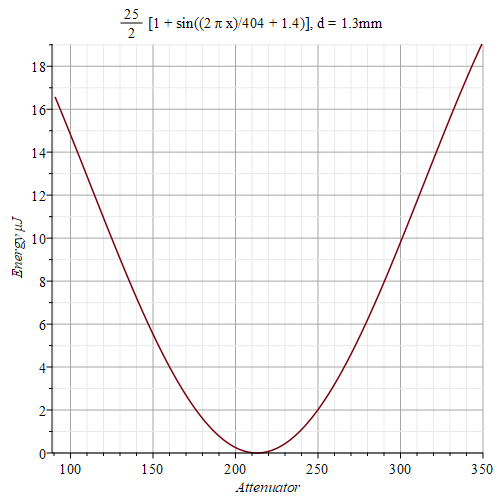
Bonjour, voici la courbe l'energie UV sur la cathode vs la position d'attenuateur pour l'iris=1.3mm (l'energie MAX=25mkJ). Les courbes sont identiques pour tous les diametres d'iris sauf les energies MAX sont differents:
d=1.3mm Emax=25mkJ ; d=2mm Emax=50mkJ ; d=3mm Emax=73mkJ ; d=4mm Emax=88mkJ ; d=5mm Emax=97mkJ (les energies MAX actuelles)
Viktor |
| Attachment 1: Att_Energy.png
|
 |
|
33
|
Tue Jun 3 17:00:58 2025 |
Entered by Viktor Soskov from 134.158.195.153 on Tue Jun 3 17:00:35 2025 | Fixed | Info | Laser |
|
Attenuator Energy | |
|
| Attachment 1: UV_energy_vs_Attenuator.pdf
|
|
34
|
Wed Jun 25 15:18:09 2025 |
Entered by Viktor Soskov from 134.158.195.153 on Wed Jun 25 15:17:47 2025 | Fixed | Linac | Laser |
|
Etat laser | |
L'energie_Max UV actuelle sur la cathode est 26mkJ (Att.: 420, iris: 1.3mm)
Viktor. |
|
35
|
Mon Sep 15 11:54:53 2025 |
ND | Fixed | Anneau | Aimants |
|
Test cyclage QP5 | |
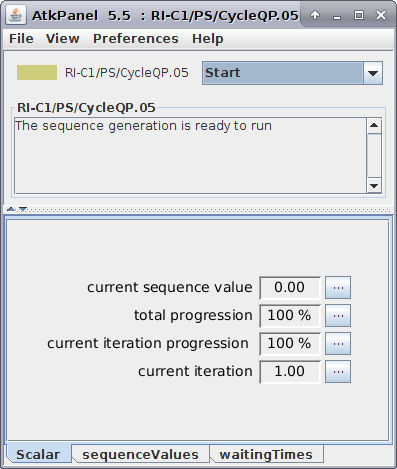
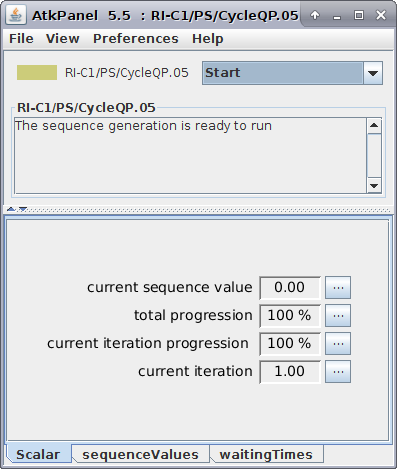
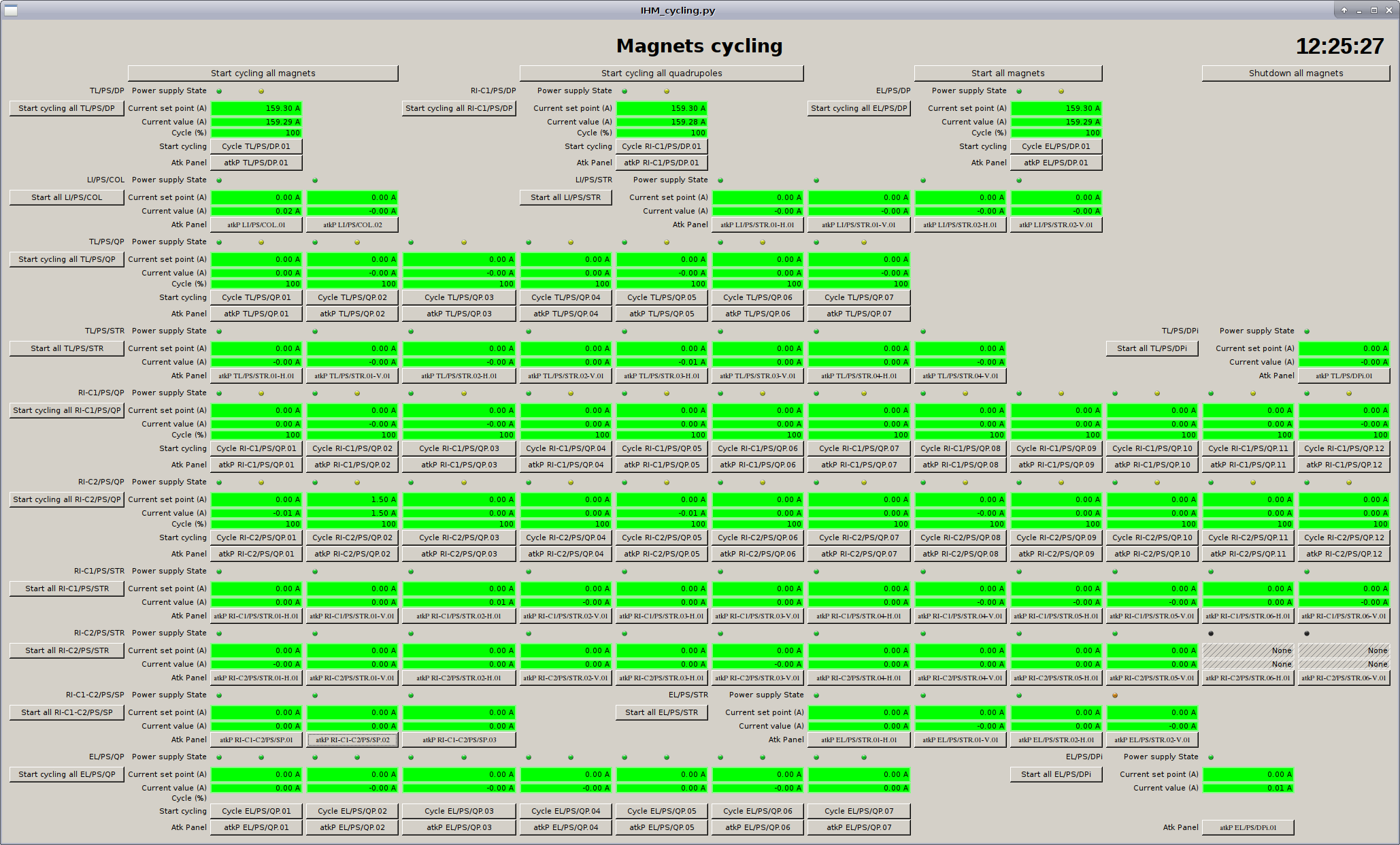
11:50 Test de cyclage QP5:OK
12:04 Test de cyclage de tous les aimants: OK
Pas de probleme observe avec le cyclage de QP5 (ni avce les autres aimants).
Verifier l'existence de RI-C2/PS/STR.06
12:26 Extinction des aimants
|
| Attachment 1: Screenshot_from_2025-09-15_12-03-10.png
|
 |
| Attachment 2: Screenshot_from_2025-09-15_12-13-06.png
|
 |
| Attachment 3: Screenshot_from_2025-09-15_12-25-28.png
|
 |
|
36
|
Thu Oct 9 08:53:26 2025 |
KD | Fixed | Info | note | Linac | Opt |
|
changement iris motorisée | |
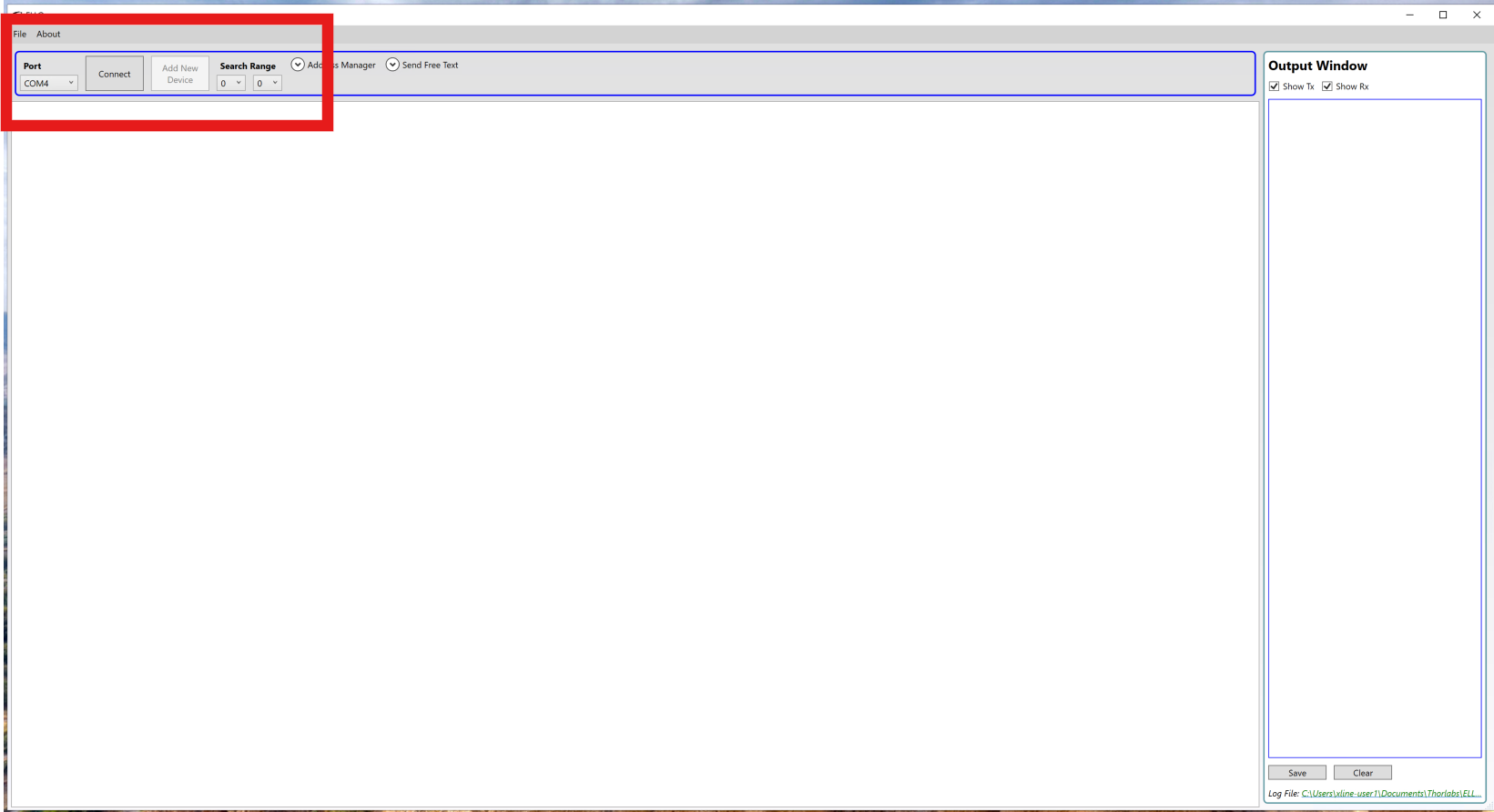
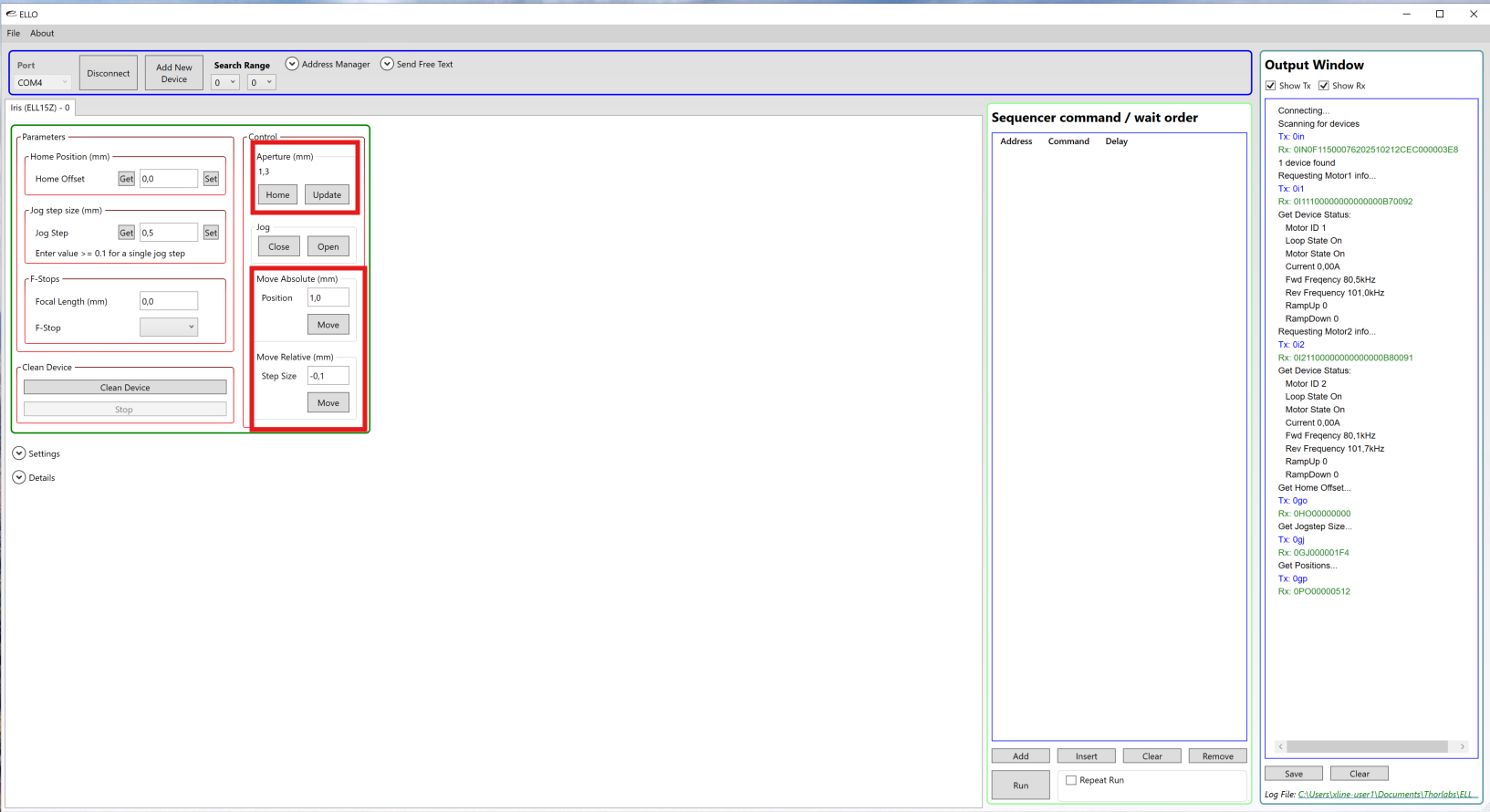
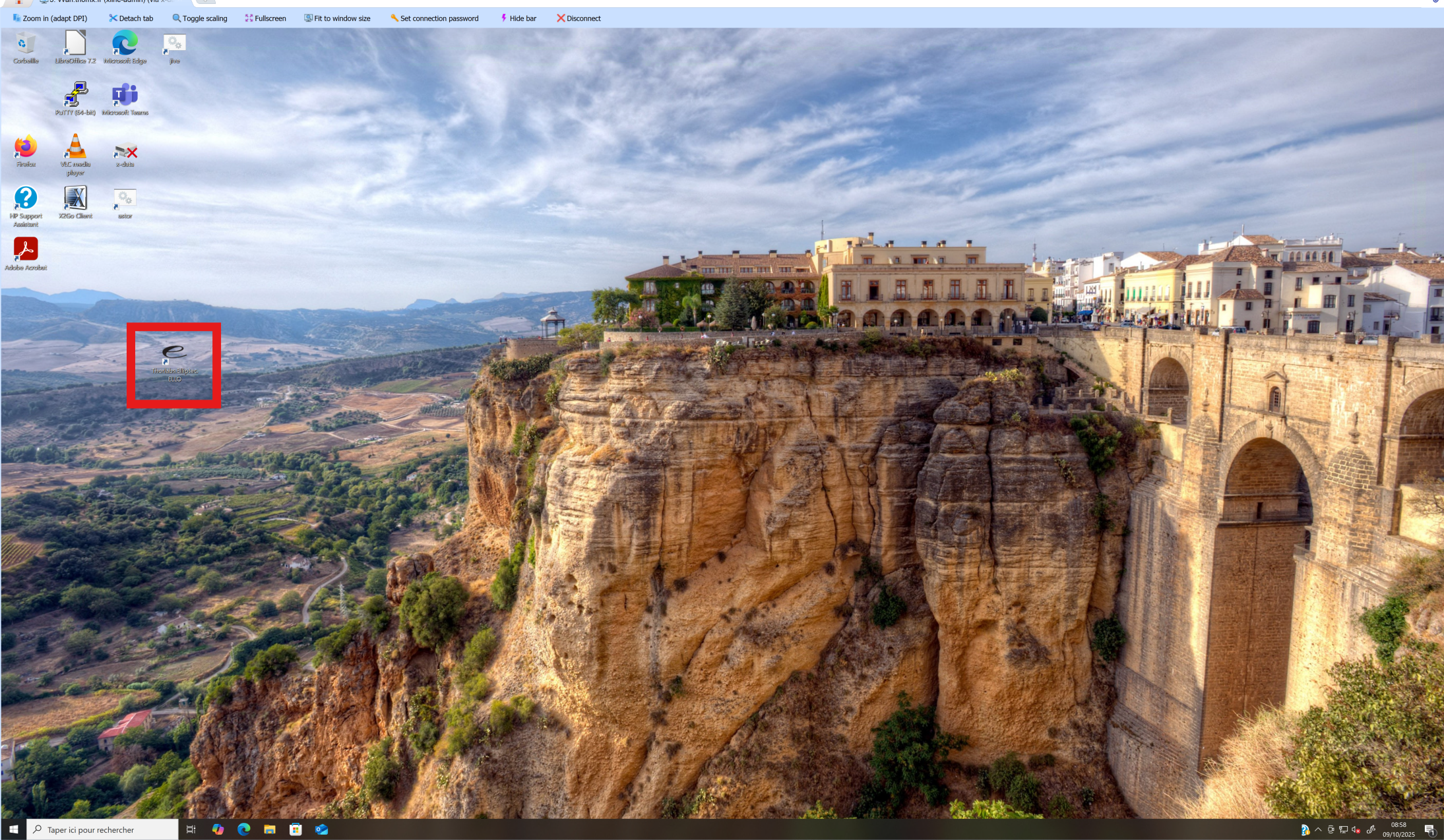
08/10/2025 : mise en place de l'iris motorisée temporaire (Thorlabs Eliptec ELL15Z) . Pour y accéder et la controler :
- se connecter sur vvan2.thomx.fr (compte: xline-user1 ; pass: Th0mX-user1)
- lancer l'application sur le bureau "Thorlabs.Elliptec.ELLO"
- choisir dans port: "COM4", le search Range "0" à "0" (sinon cela prend plus de temps pour la connection) ==> cliquer sur "Connect"
- Dans l'interface sur le panneau "Control", il y a la position actuelle et le contrôle des mouvements. (actuellement l'iris est réglé sur 1.3mm).
/!\ ne pas toucher aux autres paramètres
Janvier 2026: remise en place de l'IRIS SmarAct.
|
| Attachment 1: Eliptec_1.png
|
 |
| Attachment 2: Eliptec_2.png
|
 |
| Attachment 3: programme.png
|
 |